Lesson 5: Navigating the EDTC LMS — Learner Platform User Guide
Unit Information & Metadata
- Lesson ID: EDTC-0-F100_L05
- Estimated Study Duration: 90 Minutes (60 min core instructional reading + 30 min practical platform navigation & quiz)
- Target EQF Level: Level 3–4 (Vocational Awareness / Entry Micro-Credential Prerequisite)
1. Lesson Opening
1. Learning Objectives
- Navigate the European Digital Trade Center (EDTC) Learning Management System (LMS) interface, dashboard, and course player in full compliance with European accessibility and user data privacy standards (LO0.5.01).
- Execute interactive course activities, including video lectures, SCORM-compliant instructional text, downloadable practical toolkits, and discussion forums (LO0.5.02).
- Complete native EDTC assessment formats—including Single Choice, Multiple Choice, True or False, Fill in the Blanks, and Sorting Choice items—following strict submission and feedback protocols (LO0.5.03).
- Track personal competency progression, manage digital identity verification via eIDAS 2.0 standards, and export verified Open Badges 3.0 and Europass-compliant micro-credentials (LO0.5.04).
1.2 Business Relevance
For small and medium-sized enterprises (SMEs), logistics operators, freight forwarders, and trade compliance staff, onboarding onto an enterprise learning platform must be seamless, secure, and operationally transparent. Misinterpreting platform mechanics, failing to locate essential downloadable execution toolkits, or improperly submitting regulatory capstone assignments can delay employee qualification and corporate compliance certification. Mastering the EDTC LMS environment ensures that enterprise personnel can efficiently absorb training materials, execute mandatory workplace assessments, and verify micro-credentials required by trade partners, port authorities, and customs administrations across the 27 EU Member States.
1.3 Key Concepts Preview
EDTC LMS Architecture; Dashboard Navigation; Course Player Controls; eIDAS 2.0 Digital Identity Verification; GDPR Learner Data Privacy; EDTC Assessment Engine; Formative vs. Summative Quizzes; Downloadable Toolkit Repository; Open Badges 3.0 Standard; Europass Micro-Credential Integration.
2. Core Instructional Content
2.1 Platform Architecture, Authentication, and Privacy Controls
The European Digital Trade Center Learning Management System (EDTC LMS) is built on an enterprise-grade engine, specifically customized to meet stringent European Union standards for web accessibility, cybersecurity, and digital identity verification [1, 2]. Designed to serve adult vocational learners across diverse European logistics corridors, the platform provides an intuitive, high-performance portal accessible via desktop web browsers, tablet displays, and mobile devices [3].
Understanding the structural architecture of the EDTC LMS begins with account creation and authentication. In alignment with European Union digital identity standards under Regulation (EU) 2024/1183 (eIDAS 2.0 Framework), the platform supports secure Single Sign-On (SSO) and Multi-Factor Authentication (MFA) protocols [2]. Learners may access their account using national electronic identification schemes—such as Portugal’s Chave Móvel Digital or eIDAS-compliant European Digital Identity Wallets—or through secure corporate email credentials verified via automated two-factor authentication tokens [2, 4]. This high level of authentication security ensures that learner progress records, assessment scores, and issued micro-credentials are legally traceable to verified individuals, satisfying statutory requirements for professional vocational qualifications [5].
Data privacy and user sovereignty represent foundational pillars of the EDTC platform architecture. Operating in strict compliance with Regulation (EU) 2016/679 (General Data Protection Regulation – GDPR), the LMS guarantees that all personal identifiable information (PII), learning analytics, assessment logs, and payment processing records are stored exclusively within high-security, sovereign data centers located within the European Union [1, 6]. The learner dashboard includes a dedicated Privacy & Data Governance Control Center where users can inspect their data footprint, manage communication preferences, export complete activity archives in machine-readable JSON/CSV formats (fulfilling the GDPR Right to Data Portability under Article 20), or initiate account anonymization protocols [1]. Furthermore, no learner data or activity metrics are ever monetized, shared with unauthorized third parties, or processed by external unvetted artificial intelligence systems outside certified European cloud environments [1, 7].
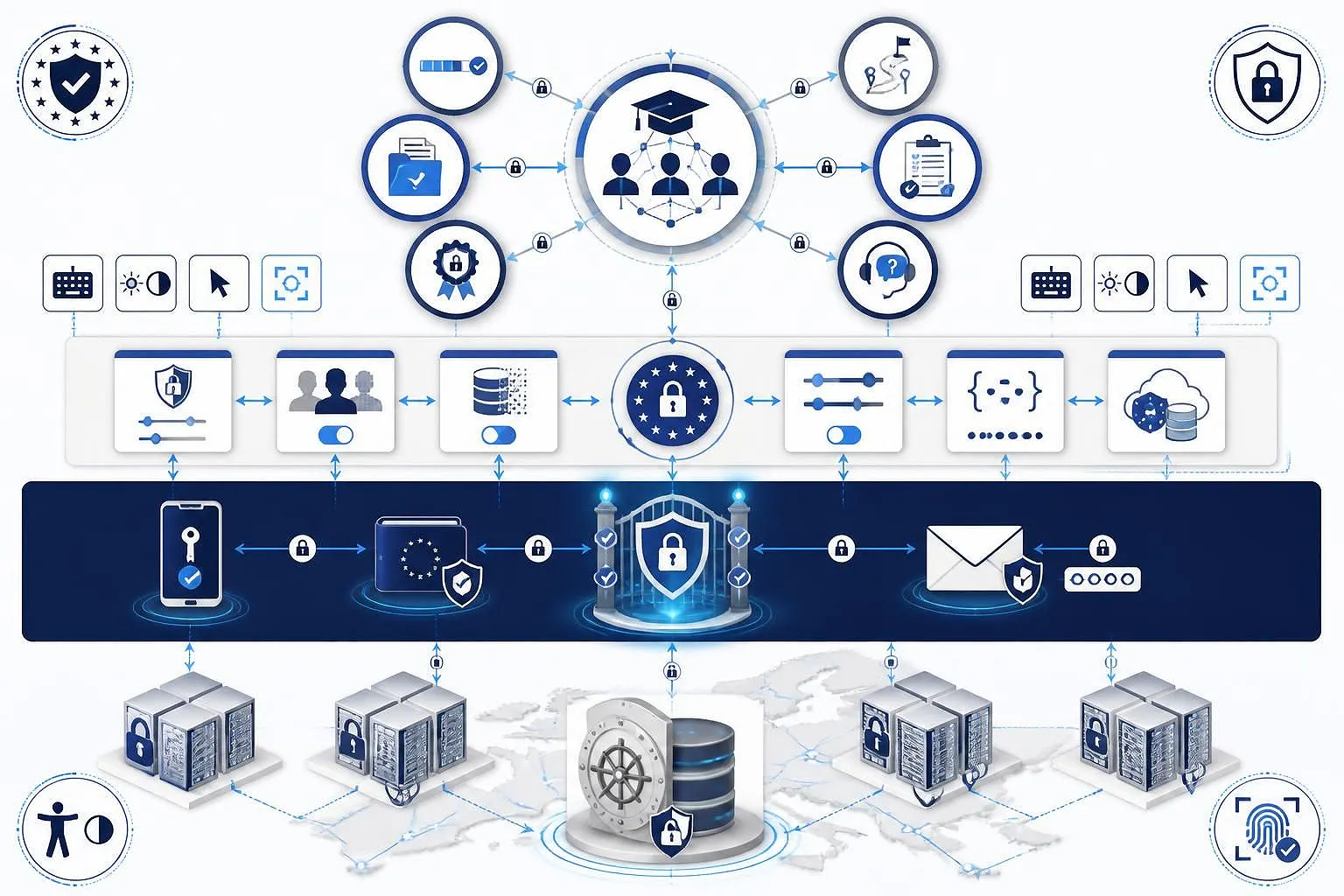
Upon logging into the EDTC LMS, the learner is greeted by the Central Learner Dashboard. The dashboard layout is organized into six primary functional areas designed to streamline daily study workflows:
- Active Enrollment Overview: Displays real-time progress bars, upcoming assessment deadlines, and quick-launch links for all currently enrolled Foundation, Applied, and Advanced courses.
- Personal Learning Pathway Tracker: Visualizes progression along the learner’s chosen EDTC Professional Credential Pathway (e.g., European Customs Compliance Specialist or Digital Supply Chain Architect), indicating completed micro-credentials and remaining mandatory modules.
- Downloadable Resource Repository: Provides instant access to all unlocked practical toolkits, including PDF workflow checklists, Excel calculation matrices, decision trees, and administrative contact directories associated with completed and active lessons.
- Assessment & Final Exam Portal: Summarizes quiz history, attempt scores, detailed instructor feedback on submitted capstone assignments, and scheduled time windows for summative final course examinations.
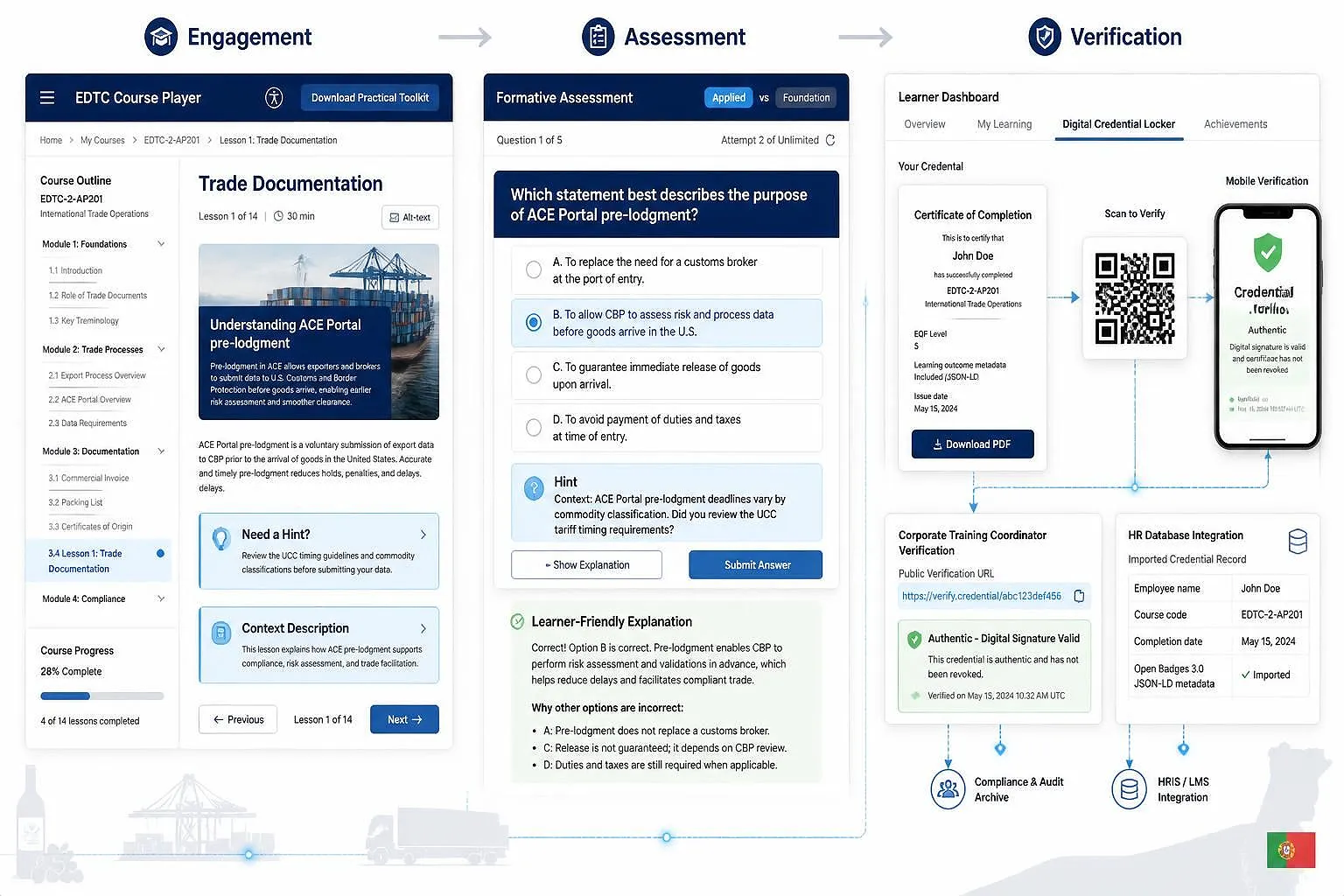
- Digital Credential Locker: Houses all earned Open Badges 3.0 and Europass-compliant digital micro-credential certificates, complete with cryptographic verification links, QR codes, and 1-click export tools for professional social networks and national talent databases.
- Notification & Support Helpdesk: Displays system updates, regulatory alert feeds (e.g., urgent TARIC nomenclature updates or eFTI portal implementation directives), and a direct ticketing interface to communicate with EDTC technical support staff and subject-matter experts.
The platform user interface fully adheres to Directive (EU) 2016/2102 on the accessibility of the websites and mobile applications of public sector bodies, incorporating World Wide Web Consortium (W3C) Web Content Accessibility Guidelines (WCAG) 2.1 Level AA standards [3]. Learners can customize display contrast modes (including high-contrast dark mode for low-light environments), adjust text scaling up to 200% without breaking layout integrity, toggle screen-reader compatibility tags, and navigate the entire interface using keyboard shortcuts [3].
2.2 Course Navigation, Content Interaction, and Progress Tracking
Once a learner selects an active course from their dashboard—such as EDTC-1-F101 Introduction to European Digital Trade—they enter the EDTC Course Player interface. The course player is designed to provide a distraction-free, focused learning environment optimized for deep cognitive engagement and practical skill acquisition [8].
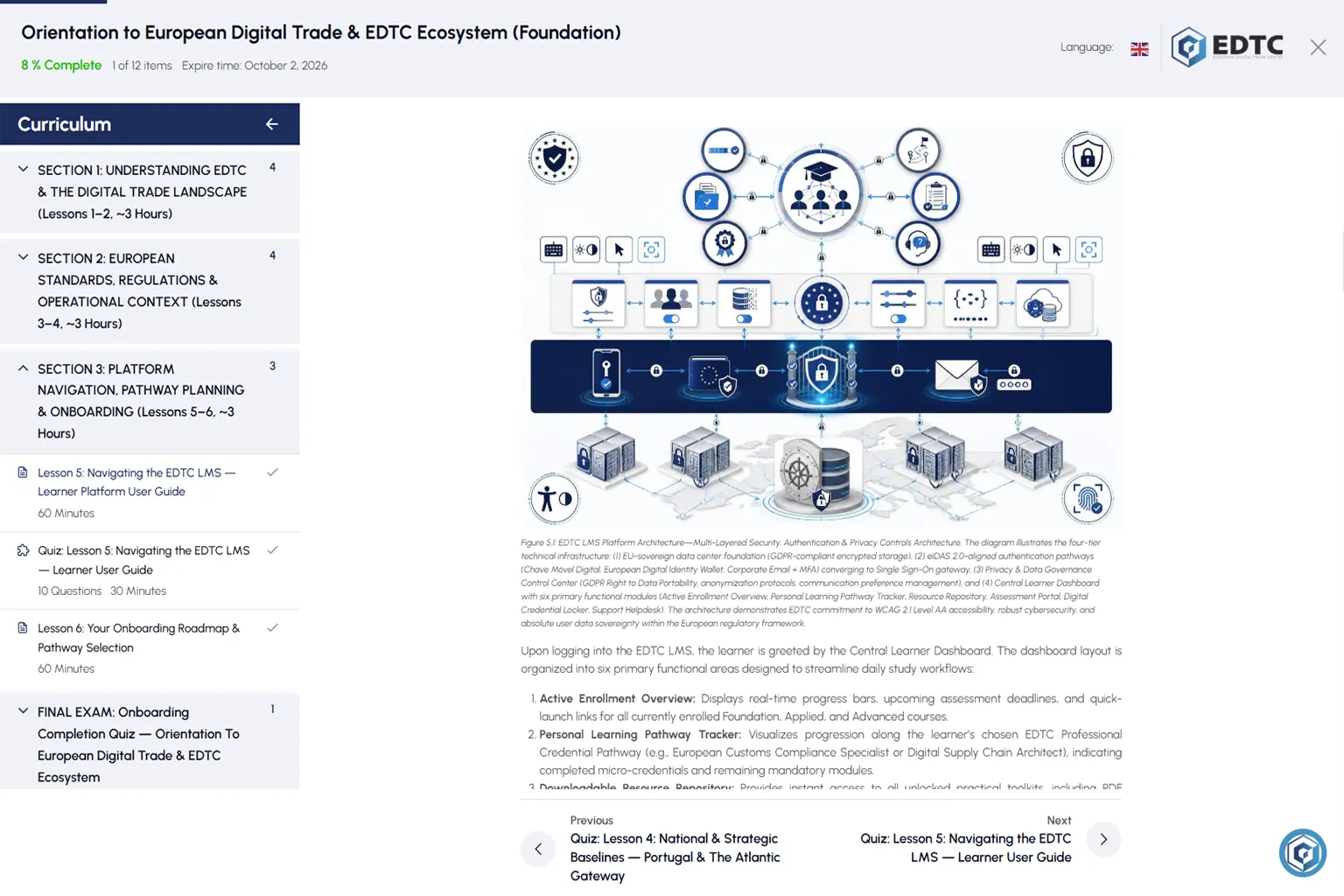
The course player screen is divided into two main panels:
- Left Collapsible Navigation Sidebar: Displays the complete course structure organized by sections and individual lessons. Each lesson entry indicates its estimated study duration (e.g., 90 minutes), completion status (represented by a green checkmark or hollow circle), and asset type tags (e.g., Reading, Interactive Case Study, Formative Quiz). Learners can collapse this sidebar at any time to expand the primary reading window.
- Right Primary Content Stage: Renders the main instructional lesson content in clean, highly legible Rich Text HTML. This stage incorporates embedded high-resolution visual infographics, structured data tables, highlighted mandatory/recommended regulatory tags, and interactive expander blocks for technical definitions [8].
Navigating through an individual lesson follows a structured, pedagogical flow designed according to European Quality Assurance in Vocational Education and Training (EQAVET) principles [9]. As the learner scrolls through the 7,800-word instructional text, the platform automatically tracks reading progress using passive scroll-depth sensors and time-on-page analytics. These tracking mechanisms ensure that learners do not accidentally skip critical instructional subsections or practical case study analyses [9, 10].
Content interaction within the course player extends far beyond passive reading. To accommodate diverse adult learning styles and universal design for learning (UDL) principles, each lesson integrates several interactive learning tools:
- Embedded Visual Asset Gallery: High-impact infographics, workflow flowcharts, and bento-grid diagrams embedded throughout the text can be expanded to full-screen view with a single click, allowing detailed examination of complex supply chain data exchanges and port community system interfaces.
- Interactive Regulatory Tagging: Technical terms tagged as MANDATORY or RECOMMENDED are linked to pop-up tooltips providing immediate contextual definitions, governing European legal articles (e.g., Union Customs Code Article 9 or eFTI Regulation Article 5), and practical operational warnings [11].
- Personal Study Notepad & Highlighting: Learners can select any passage of text within the lesson to apply color-coded highlights or attach private study notes. These notes are automatically aggregated into the learner’s personal dashboard under the ‘Course Notes’ tab, creating a customized revision guide for final examinations.
- Downloadable Practical Toolkit Drawer: Located at the header of each lesson, a dedicated download button provides immediate access to the lesson’s associated workplace toolkits (e.g., PDF workflow checklists, Excel calculation matrices, or laminatable cheat-sheets). These files are saved directly to the learner’s local device for immediate workplace deployment.
- Lesson Discussion & Peer Q&A Forum: Positioned at the footer of each lesson, an asynchronous discussion board allows learners to post technical questions, share regional implementation experiences (e.g., local port clearance practices at Sines, Leixões, or Aveiro), and interact with certified EDTC instructors.
Progress tracking within the EDTC LMS operates on a transparent, milestone-based completion model. A lesson is marked as ‘Officially Complete’ only when three sequential criteria are met: (1) 100% scroll depth and minimum time-on-page requirements are fulfilled; (2) all embedded practical case studies and interactive reflection exercises are reviewed; and (3) a passing score is achieved on the lesson’s formative 10-question quiz [8, 12]. Progress bars on the main course page and learner dashboard update dynamically in real time, providing immediate positive reinforcement and clear visual guidance on remaining course requirements [8].
2.3 Interactive Assessments, Quizzes, and Capstone Project Submissions
Assessment within the EDTC LMS serves a dual purpose: reinforcing knowledge retention during study and rigorously verifying workplace competency for formal micro-credential certification [5, 9]. The platform assessment engine is powered by native EDTC quiz architecture, fully upgraded to support five interactive question formats that evaluate different levels of Bloom’s Taxonomy [8].
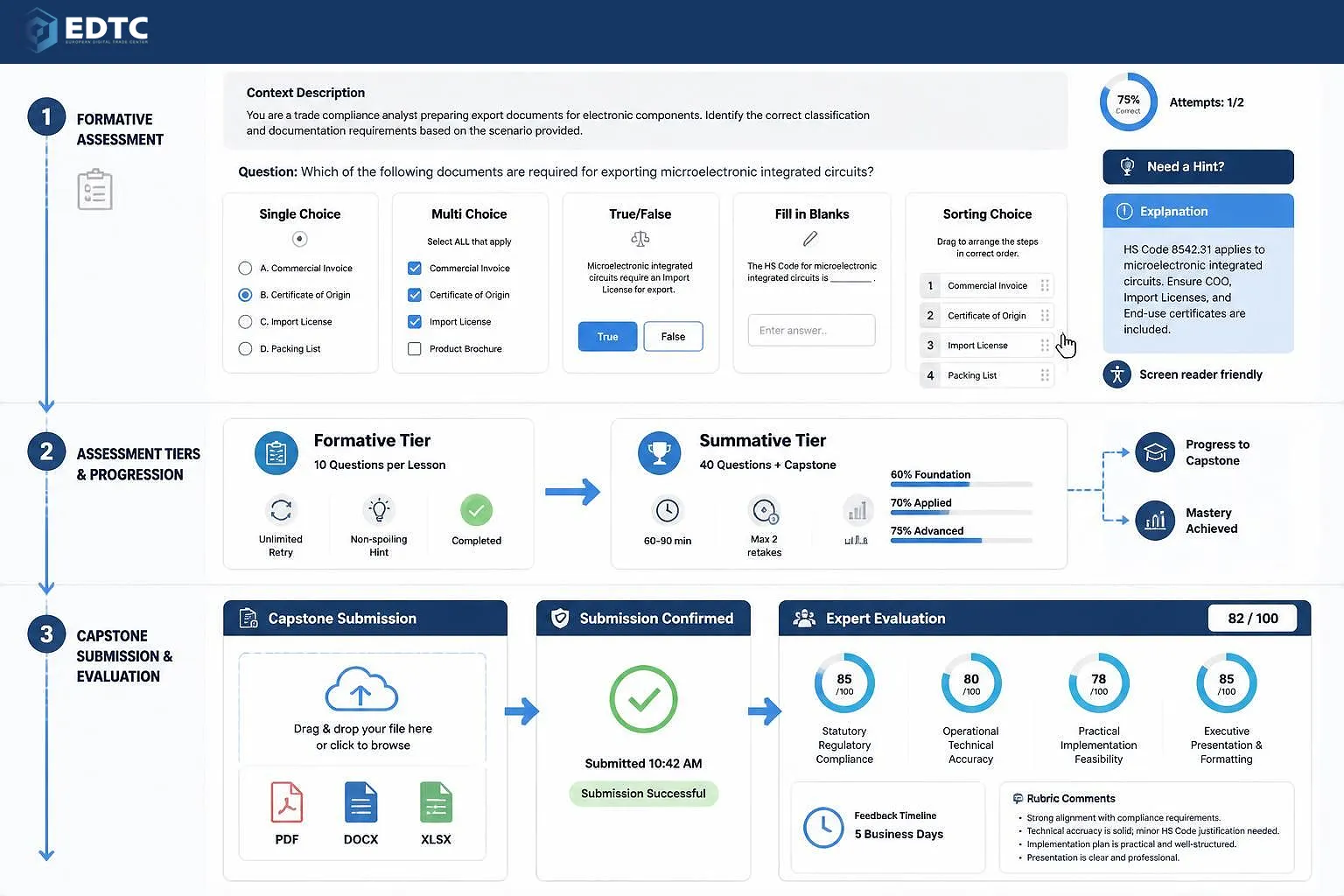
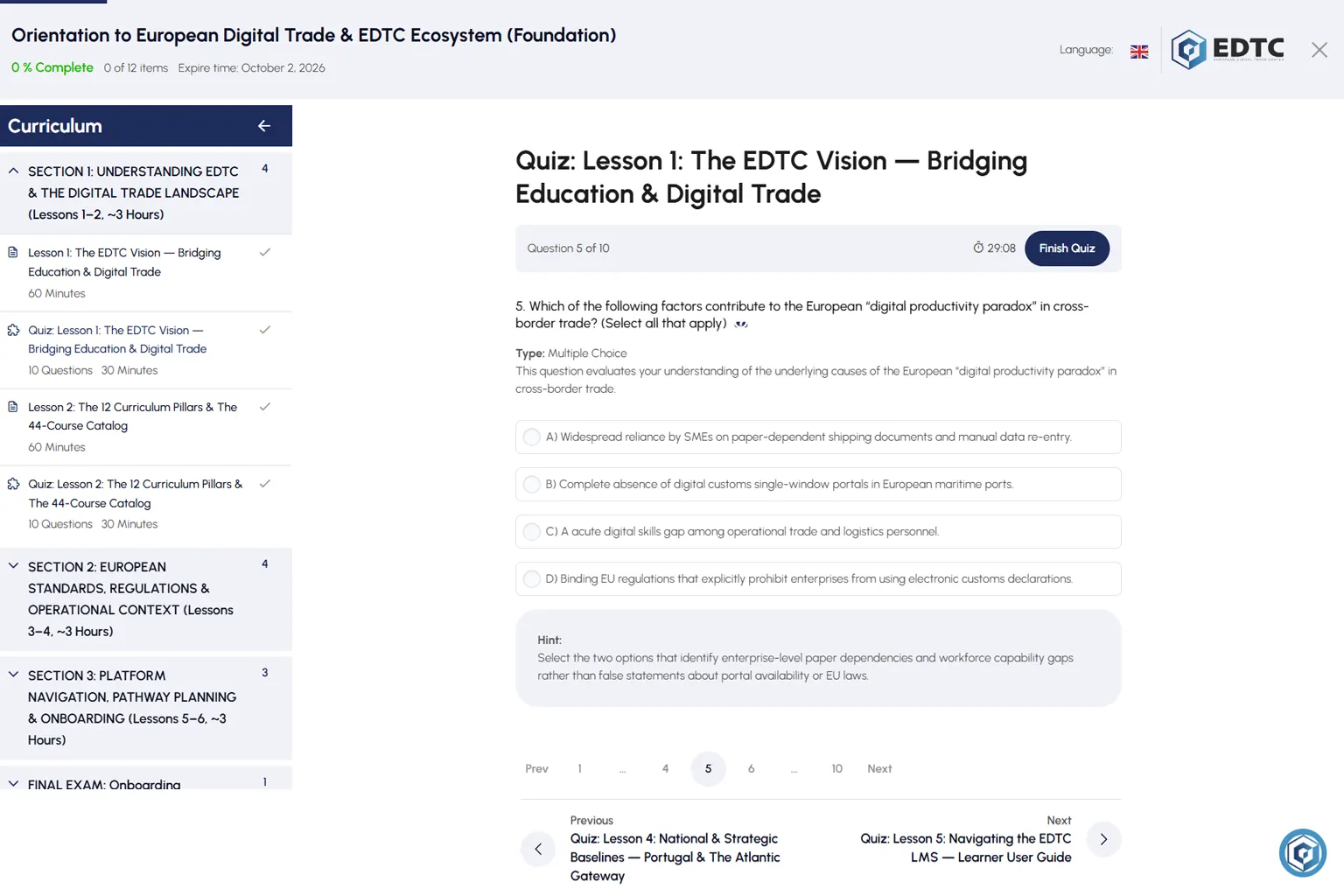
Learners encounter two distinct tiers of assessment throughout their educational journey:
- Formative Lesson Quizzes (10 Questions per Lesson): Administered at the conclusion of every lesson to test immediate recall, conceptual understanding, and practical scenario application. Formative quizzes allow unlimited retry attempts, incorporate non-spoiling hints, and provide detailed explanations upon completion [8, 12].
- Summative Final Course Examinations (40 Questions per Course) & Capstone Projects: Administered upon completing all course lessons. Summative exams synthesize competencies across the entire curriculum, enforce strict time limits (e.g., 60–90 minutes), limit retake attempts (maximum 2 retakes), and require specific pass thresholds based on course level: 60% for Foundation Tier, 70% for Applied Tier, and 75% for Advanced Tier [5, 8].
To ensure pedagogical variety and test practical execution skills, all quizzes utilize five native EDTC question formats:
- Single Choice: Evaluates single-fact recall, primary legal rule selection, or correct identification of a governing authority. The learner selects exactly one radio button option from four plausible choices (A–D).
- Multiple Choice: Evaluates multi-faceted operational concepts, eligibility criteria, or complex supply chain benefits. The learner selects one or more checkboxes from four options. The prompt explicitly state (Select ALL that apply).
- True or False: Tests binary statement validity, mandatory vs. optional procedural rules, or regulatory boundaries. The learner evaluates whether a concise statement is True or False.
- Fill in the Blanks: Assesses exact technical terminology, portal names (e.g., ACE Portal, Janela Única Logística – JUL), or legal regulation numbers. The learner reads a cloze passage and selects or types the correct missing word/phrase for configured blank fields.
- Sorting Choice: Evaluates procedural sequences, step-by-step customs workflows, or digital maturity progression logic. The learner drags and drops four unsorted operational items into the correct 1–4 chronological sequence.
Every assessment item presented on the EDTC LMS includes three mandatory support features designed to optimize learning outcomes:
- Context Description (1 Sentence): Opens the question by framing the background business or regulatory scenario (e.g., “This question evaluates your understanding of how Portuguese Tax & Customs Authority pre-lodgment rules apply to Atlantic sea freight.”).
- Non-Spoiling Hint: An interactive ‘Need a Hint?’ button provides supportive guidance that assists stuck learners without revealing the answer option letter or key term.
- Learner-Friendly Explanation: Displayed after submitting an answer or reviewing completed quiz attempts, offering clear reasoning for why the correct option is right and why distractors are wrong. In accordance with EDTC educational standards, explanations use plain-language regulatory references (e.g., “under European Digital Single Market policy guidelines”) rather than raw internal database tags [11].
For Applied and Advanced tier courses, learners must also complete an Applied Capstone Project [5]. The Capstone submission interface allows learners to upload completed executive reports, financial calculation models, or strategic action plans in standard PDF, DOCX, or XLSX formats. Upon submission, the file is routed to certified EDTC subject-matter experts (SMEs) for double-blind evaluation against a published rubric assessing four dimensions: (1) Statutory Regulatory Compliance, (2) Operational Technical Accuracy, (3) Practical Implementation Feasibility, and (4) Executive Presentation & Formatting [5, 9]. Detailed instructor feedback and scored rubrics are returned directly to the learner’s dashboard within five business days.
2.4 Digital Credentials, Badges, and Europass Micro-Credential Export
Upon successfully completing a course—satisfying the 100% lesson reading requirement, passing all formative lesson quizzes, achieving the required threshold on the summative final exam, and securing approval on the Capstone project—the EDTC LMS automatically triggers the issuance of a formal European Micro-Credential [5, 13].
Micro-credentials issued by the EDTC adhere strictly to European Union educational standards set forth in Council Recommendation 2022/C 243/02 on a European approach to micro-credentials for lifelong learning and employability [13]. Each issued credential represents a verified learning outcome aligned to the European Qualifications Framework (EQF Levels 3–6) and mapped to specific DigComp 3.0 competence areas, providing transparent evidence of workplace capability to employers, trade associations, and national authorities across Europe [5, 13, 14].
To ensure absolute authenticity and tamper-proof verification, EDTC digital credentials are issued using two complementary international technology standards:
- W3C Verifiable Credentials & Open Badges 3.0 Standard: Credentials are cryptographically signed using open, decentralized metadata standards maintained by the World Wide Web Consortium (W3C) and 1EdTech [15]. Each digital badge embeds rich metadata directly into its image file and JSON-LD manifest, detailing the learner’s name, course title, EQF level, study workload hours, specific learning outcomes achieved, assessment score, issuing body, and unique cryptographic hash [15].
- Europass Digital Credentials Infrastructure (EDCI): The platform generates fully compliant Europass Micro-Credential XML/PDF dossiers that can be imported directly into a learner’s personal Europass Digital Wallet, maintained by the European Commission [16]. This ensures that earned qualifications are officially recognized within national employment portals (such as Portugal’s Instituto do Emprego e Formação Profissional – IEFP) and European mobility frameworks [16].
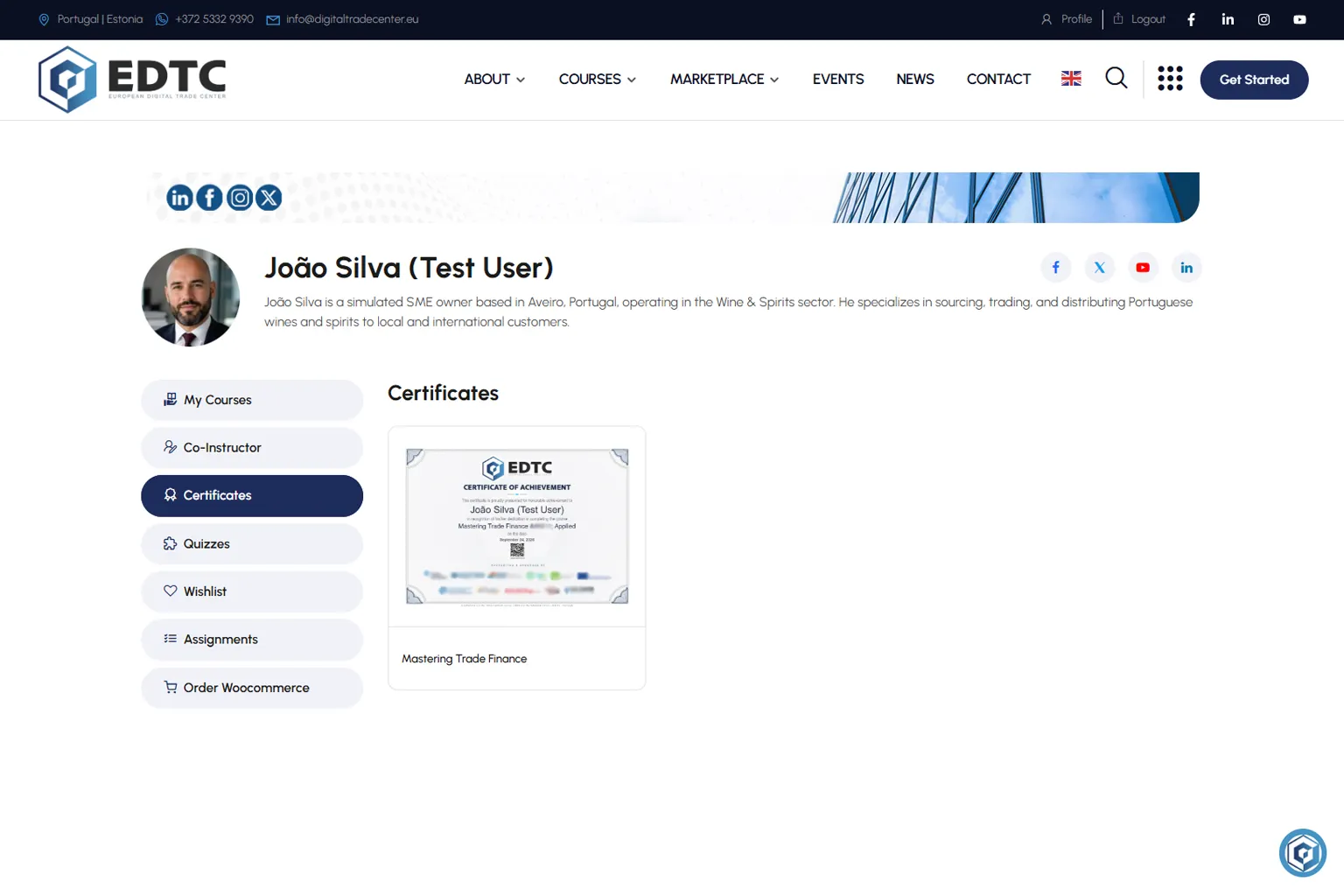
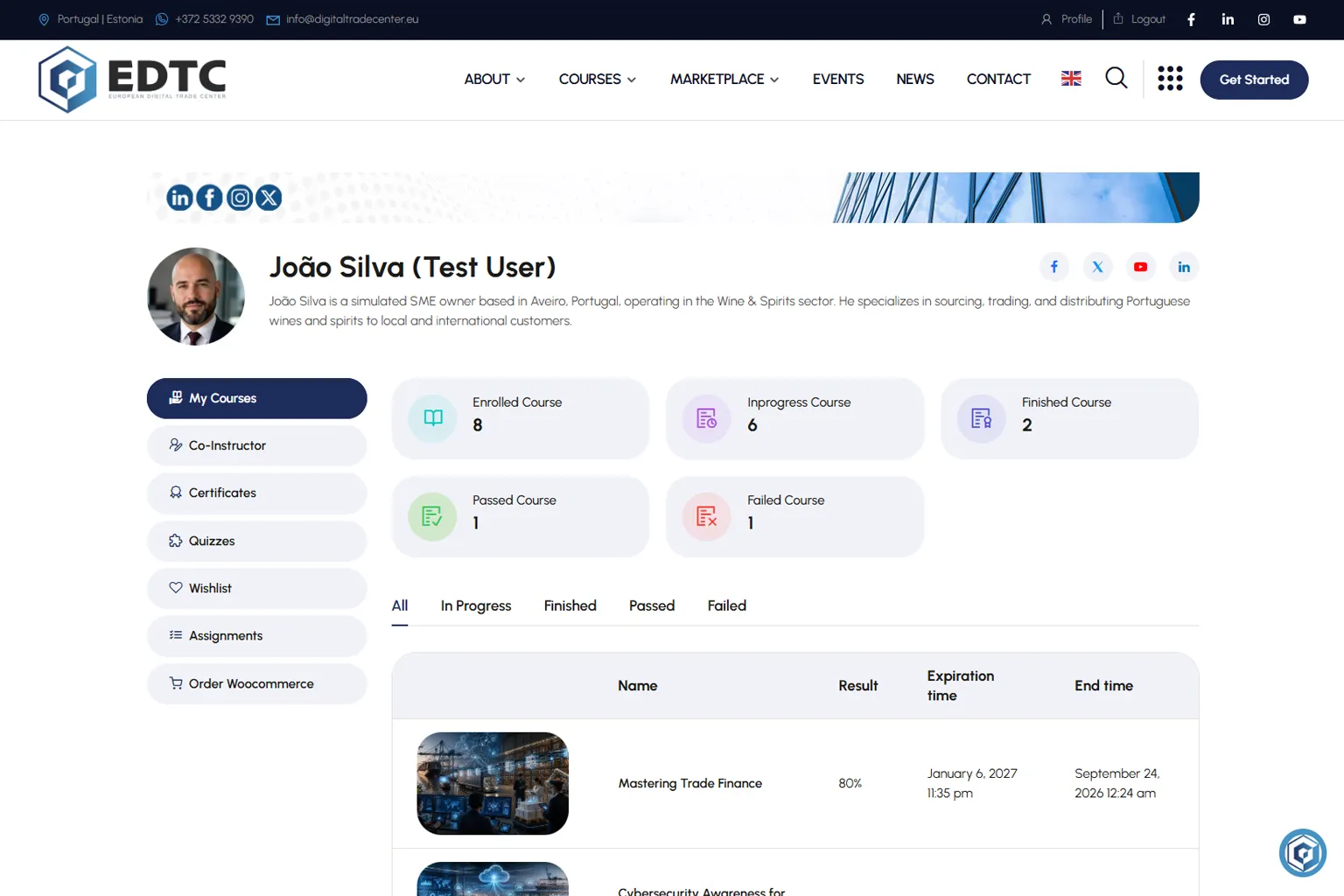
Learners manage and share their earned qualifications directly from the ‘Certificates’ tab on their dashboard. The locker provides four instant distribution tools:
- Official PDF Certificate Export: Generates a high-resolution, print-ready certificate containing formal accreditation watermarks, authorized issuer logos, and a prominent QR code for instant offline verification.
- Cryptographic Verification URL Matching Certificate QR Code: Generates a unique public web link matching the certificate’s QR Code (e.g.,
https://digitaltradecenter.eu/certificate/5b593749a350....) that allows employers, freight forwarders, or customs auditors to independently verify credential authenticity in real time without creating a platform account [15]. - One-Click Downloadable PDF and Social Sharing: Pre-formats certificate metadata and graphics for direct download as a PDF or instant sharing across Facebook, Twitter, and direct links—enabling seamless presentation across both devices and learner networks.
- Europass Wallet Direct Sync (Coming Soon): Transmits the signed digital credential package directly to the learner’s European Commission Europass account via secure API endpoints [16].
By establishing an auditable, cryptographically secure credentialing ecosystem, the EDTC LMS ensures that adult learners can continuously stack individual micro-credentials into complete, professional qualification pathways—transforming individual course achievements into recognized career advancement across European digital trade corridors [5, 13].
3. Practical Workflow: Learner LMS Navigation & Platform Utilization
- Business Activity: Standard Operating Procedure for Enterprise Learner Onboarding, Course Navigation, Assessment Completion, and Credential Export on the EDTC LMS.
- Responsible Roles: Enterprise Learner (Export Clerk / Logistics Manager); Corporate Training Coordinator; EDTC Platform Administrator; Certified Course Instructor.
Onboarding & Navigation Workflow
| Step | Onboarding & Navigation Action Item | Required Input / Tool | Operational Decision Point | Escalation & Support Trigger |
|---|---|---|---|---|
| 1 | Execute secure platform authentication and profile setup. | eIDAS 2.0 / Chave Móvel Digital / Corporate SSO Login | Are digital identity credentials verified and GDPR privacy settings configured? | If authentication fails, request technical helpdesk token verification [1, 2]. |
| 2 | Access Central Dashboard and launch assigned course. | EDTC Central Learner Dashboard & Course Catalog | Is the learner enrolled in the correct Foundation, Applied, or Advanced course? | If course assignment is missing, consult Corporate Training Coordinator [5]. |
| 3 | Engage with lesson content and download workplace toolkits. | EDTC Course Player & Practical Toolkit Drawer | Have all 7,800-word instructional subsections and visual assets been reviewed? | If downloadable toolkits fail to open, clear browser cache or request PDF via support [8]. |
| 4 | Complete formative lesson quizzes and submit Capstone assignment. | Native LMS Assessment Engine & Upload Portal | Has the required pass threshold (60% F / 70% AP / 75% AD) been achieved on quizzes? | If quiz attempt fails max limit, review lesson content and request instructor retry unlock [8, 12]. |
| 5 | Verify earned micro-credential and export to digital wallets. | EDTC Credential Locker & Europass Sync API | Is the digital badge metadata cryptographically verified and PDF signed? | If Europass sync fails, download signed XML/PDF dossier for manual upload [13, 16]. |
4. Realistic Enterprise Scenario
4.1 Scenario Narrative
Transportes Douro Lda., a medium-sized freight forwarding and road haulage firm based in Peso da Régua (Porto region, Portugal), specializes in transporting port wine, agricultural products, and manufactured textiles to distributors in Spain, France, and Germany. To comply with incoming European Electronic Freight Transport Information (eFTI Regulation (EU) 2020/1056) mandates and streamline customs pre-lodgment on the Portuguese ACE Portal, the Operations Manager enroots two junior export clerks—Sofia and Miguel—into EDTC-2-AP201 (Trade Documentation).
Upon logging into the EDTC LMS for the first time, Sofia and Miguel encounter operational friction:
-
- Miguel struggles to locate the downloadable 40-Point Pre-Submission Customs Document Audit Checklist (
EDTC-2-AP201_TOOL1) because he did not realize that practical toolkits are located in the top drawer header of the EDTC Course Player. - Sofia completes Lesson 1’s instructional reading but fails her first attempt on the 10-question formative quiz (scoring 50% against the required 70% Applied tier threshold) because she rushed through the scenario-based application questions without clicking the ‘Need a Hint?’ button or reading the Context Descriptions.
- After completing the course, the Corporate Training Coordinator at Transportes Douro Lda. needs to verify Sofia and Miguel’s micro-credentials to present proof of employee upskilling during a logistics client audit, but does not know how to validate the cryptographic authenticity of their Open Badges 3.0 certificates or import them into the company’s human resources database.
- Miguel struggles to locate the downloadable 40-Point Pre-Submission Customs Document Audit Checklist (
4.2 4-Part Evaluation Key & Evaluation Breakdown
Part 1: Primary Operational & Technical Diagnosis:
- Miguel’s inability to locate
EDTC-2-AP201_TOOL1stems from a lack of familiarization with the EDTC Course Player interface layout, specifically the top header navigation drawer where practical toolkits are stored [8]. - Sofia’s quiz failure reflects improper assessment execution strategy—rushing through Applied tier questions without utilizing embedded learning supports (Context Descriptions and Non-Spoiling Hints) or reviewing detailed explanation feedback [8, 12].
- The Corporate Training Coordinator’s verification barrier is caused by unfamiliarity with modern W3C Open Badges 3.0 cryptographic verification mechanisms and Europass Digital Credentials Infrastructure (EDCI) export tools [15, 16].
Part 2: Recommended 5-Step LMS Remediation Strategy:
- Step 1 (Toolkit Access): Instruct Miguel to open Lesson 1 in the EDTC Course Player, expand the collapsible left sidebar or click the ‘Download Practical Toolkit’ button located in the top-right header toolbar, and save
EDTC-2-AP201_TOOL1directly to his workstation [8]. - Step 2 (Quiz Review & Hint Strategy): Direct Sofia to review her completed quiz attempt on the LMS dashboard to inspect the Learner-Friendly Explanations for missed questions. Instruct her to re-read Lesson 1’s core subsections on ACE Portal pre-lodgment, and initiate a second quiz attempt—this time reading every 1-sentence Context Description carefully and utilizing the ‘Need a Hint?’ button before selecting options [8, 12].
- Step 3 (Achieving Pass Threshold): Ensure Sofia achieves a score of 70% or higher on her formative quiz attempt, updating her lesson progress bar to ‘Officially Complete’ [5, 8].
- Step 4 (Credential Locker Access): Upon course completion, direct Sofia and Miguel to open the ‘Digital Credential Locker’ tab on their Central Learner Dashboard, download their official PDF certificates, and copy their unique Public Verification URLs [15].
- Step 5 (Corporate Verification & HR Import): Provide the Corporate Training Coordinator with the Public Verification URLs and QR code verification links. Demonstrate how scanning the QR code with any smartphone or clicking the URL instantly validates the cryptographic signature, EQF Level 5 status, and learning outcome metadata without requiring platform login [15, 16].
Part 3: Alternative Managed Enterprise Group Onboarding Approach:
- Transportes Douro Lda. can request a Corporate Group Enrollment Portal via the EDTC Helpdesk. This provides the Corporate Training Coordinator with a dedicated Enterprise Manager Dashboard to track employee progress, monitor quiz scores in real time, batch-download employee PDF certificates, and receive automated weekly upskilling compliance reports [5, 8].
Part 4: Common Learner & Management Misconceptions:
- Misconception A: Assuming that failed formative quiz attempts permanently lock a learner out of a course. Reality: Formative lesson quizzes allow unlimited retry attempts; retry limits apply only to summative final course examinations [8, 12].
- Misconception B: Believing that digital badges are simple static image graphics that can be easily forged. Reality: EDTC Open Badges 3.0 embed cryptographic JSON-LD metadata and digital signatures that fail instantly if altered, ensuring absolute legal authenticity [15].
- Misconception C: Assuming that learning platform activity records violate GDPR employee privacy rules. Reality: All learner analytics on the EDTC LMS are strictly governed by GDPR Article 6(1)(f) and Article 20, providing transparent data access controls and sovereign European data hosting [1, 6].
5. Governance, Educational Limitations & Glossary
5.1 Key Takeaways
- The EDTC LMS is an enterprise-grade learning platform built on WordPress, fully compliant with eIDAS 2.0 digital authentication, GDPR European data sovereignty, and WCAG 2.1 Level AA web accessibility standards [1, 2, 3].
- The EDTC Course Player provides an interactive study environment featuring a collapsible navigation sidebar, Rich Text instructional content, pop-up tooltips for mandatory/recommended tags, and a top drawer for downloading practical toolkits [8, 11].
- Progress tracking relies on real-time scroll depth sensors, time-on-page analytics, and milestone completion checks, updating visual progress bars on the Central Learner Dashboard [8, 10].
- The platform assessment engine supports five native EDTC question formats—Single Choice, Multiple Choice, True or False, Fill in Blanks, and Sorting Choice—each incorporating 1-sentence Context Descriptions, Non-Spoiling Hints, and Learner-Friendly Explanations [8, 12].
- Upon satisfying course completion requirements, the LMS automatically issues W3C Open Badges 3.0 digital badges and Europass-compliant micro-credentials, cryptographically signed and exportable to PDF, LinkedIn, and the Europass Digital Wallet [13, 15, 16].
5.2 Educational Limitation & Non-Automation Disclaimer
This unit provides practical user guidance for navigating the European Digital Trade Center (EDTC) Learning Management System (LMS). Platform interface layouts, navigation controls, and assessment features described herein represent standard user operations. Using the LMS, completing online lessons, and earning digital micro-credentials do NOT constitute direct authorization to submit legal customs declarations, execute binding commercial contracts, or represent enterprises before statutory authorities without appropriate professional licensing and legal mandates. Technical portal configurations, authentication protocols, and digital wallet integration endpoints are subject to ongoing administrative updates by European and national authorities.
5.3 Technical Glossary
- Learning Management System (LMS): An enterprise software application used to deliver, track, document, assess, and certify online educational courses and vocational training programs [8].
- eIDAS 2.0 Framework: European Union Regulation (EU) 2024/1183 establishing a secure framework for electronic identification, digital trust services, and European Digital Identity Wallets [2].
- General Data Protection Regulation (GDPR): Binding Regulation (EU) 2016/679 governing personal data processing, privacy rights, and data sovereignty across all EU Member States [1].
- Web Content Accessibility Guidelines (WCAG 2.1 AA): Technical standards established by the W3C to ensure web applications are fully accessible to individuals with disabilities [3].
- Formative Assessment: Diagnostic assessment conducted during a lesson or course to provide immediate feedback and reinforce learning without affecting final qualification standing [9, 12].
- Summative Assessment: Comprehensive evaluation conducted at the end of an instructional unit or course to measure cumulative competency achievement against published pass thresholds [5, 9].
- W3C Open Badges 3.0: Cryptographically signed, machine-readable digital credentials embedding detailed learning metadata according to international open standards [15].
- Europass Digital Credentials Infrastructure (EDCI): European Commission digital platform enabling the issuance, verification, and wallet storage of official European micro-credentials [16].
6. References & Source Material
- European Parliament & Council of the European Union. (2016). Regulation (EU) 2016/679 of the European Parliament and of the Council of 27 April 2016 on the protection of natural persons with regard to the processing of personal data and on the free movement of such data (General Data Protection Regulation). Official Journal of the European Union, L 119, 1–88.
- European Parliament & Council of the European Union. (2024). Regulation (EU) 2024/1183 of the European Parliament and of the Council of 11 April 2024 amending Regulation (EU) No 910/2014 as regards establishing the European Digital Identity Framework. Official Journal of the European Union, L 2024/1183, 1–58.
- European Parliament & Council of the European Union. (2016). Directive (EU) 2016/2102 of the European Parliament and of the Council of 26 October 2016 on the accessibility of the websites and mobile applications of public sector bodies. Official Journal of the European Union, L 327, 1–15.
- Presidência do Conselho de Ministros. (2020). Resolução do Conselho de Ministros n.º 30/2020: Aprova o Plano de Ação para a Transição Digital de Portugal. Diário da República, 1.ª série, N.º 78, 2–21.
- Council of the European Union. (2017). Council Recommendation of 22 May 2017 on the European Qualifications Framework for lifelong learning and repealing the recommendation of the European Parliament and of the Council of 23 April 2008 on the establishment of the European Qualifications Framework for lifelong learning (2017/C 189/03). Official Journal of the European Union, C 189, 15–28.
- European Data Protection Board. (2021). Guidelines 01/2021 on Examples regarding Data Breach Notification. EDPB Secretariat.
- European Parliament & Council of the European Union. (2022). Directive (EU) 2022/2555 of the European Parliament and of the Council of 14 December 2022 on measures for a high common level of cybersecurity across the Union (NIS2 Directive). Official Journal of the European Union, L 333, 80–152.
- EDTC Documentation Team. (2024). EDTC LMS Core Engine Architecture and REST API Integration Guide (Version 1.2.4). EDTC Engineering Series.
- European Quality Assurance in Vocational Education and Training. (2009). Recommendation of the European Parliament and of the Council of 18 June 2009 on the establishment of a European Quality Assurance Reference Framework for Vocational Education and Training (EQAVET) (2009/C 155/01). Official Journal of the European Union, C 155, 1–10.
- European Centre for the Development of Vocational Training. (2022). European guidelines for the development and writing of short, learning-outcomes-based descriptions of qualifications. CEDEFOP Reference Series, No. 122. Publications Office of the European Union.
- European Parliament & Council of the European Union. (2013). Regulation (EU) No 952/2013 of the European Parliament and of the Council of 9 October 2013 laying down the Union Customs Code. Official Journal of the European Union, L 269, 1–101.
- European Association for Quality Assurance in Higher Education. (2015). Standards and Guidelines for Quality Assurance in the European Higher Education Area (ESG 2015). ENQA Secretariat.
- Council of the European Union. (2022). Council Recommendation of 16 June 2022 on a European approach to micro-credentials for lifelong learning and employability (2022/C 243/02). Official Journal of the European Union, C 243, 10–25.
- Joint Research Centre. (2022). DigComp 2.2: The Digital Competence Framework for Citizens – With new examples of knowledge, skills and attitudes. Publications Office of the European Union.
- World Wide Web Consortium. (2023). Verifiable Credentials Data Model v2.0: Expressing verifiable claims on the Web. W3C Recommendation.
- European Commission. (2018). Decision (EU) 2018/Q 0503/01 of the European Parliament and of the Council of 18 April 2018 on a common framework for the provision of better services for skills and qualifications (Europass). Official Journal of the European Union, L 112, 42–53.
- Direção-Geral do Emprego e das Relações de Trabalho. (2023). Manual de Certificação de Entidades Formadoras e Qualidade Pedagógica. Ministério do Trabalho, Solidariedade e Segurança Social de Portugal.
- Agência Nacional para a Qualificação e o Ensino Profissional. (2024). Catálogo Nacional de Qualificações: Guia de Aplicação de Microcredenciais Profissionais. ANQEP Editorial.
- European Parliament & Council of the European Union. (2020). Regulation (EU) 2020/1056 of the European Parliament and of the Council of 15 July 2020 on electronic freight transport information (eFTI). Official Journal of the European Union, L 249, 33–43.
- Autoridade Tributária e Aduaneira. (2024). Manual de Operações do Portal ACE: Submissão Eletrónica de Declarações Aduaneiras e Pré-Alojamento de Mercadorias. Ministério das Finanças de Portugal.
- International Organization for Standardization. (2018). Information technology – Security techniques – Information security management systems – Requirements (ISO/IEC Standard No. 27001:2018).
- Web Accessibility Initiative. (2021). WCAG 2.1 Conformance and Accessibility Evaluation Statements. World Wide Web Consortium.